Digital Forms for Construction: Stop Losing Toolbox Talks & Safety Records
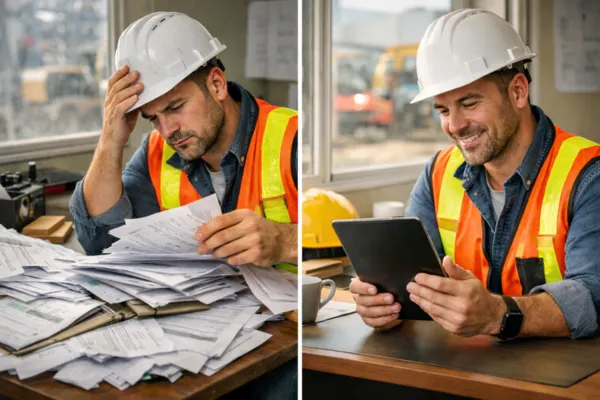
It's 6:45 AM on a Tuesday. You're standing in the job site trailer with your second cup of coffee, ready to kick off the morning toolbox talk. You reach for yesterday's safety inspection form—the one your crew lead swore he left on your desk.
It's gone.
Not in the file cabinet. Not under the stack of blueprints. Not anywhere.
And now you're scrambling. Did it blow away? Get tossed with yesterday's lunch wrappers? Was it even legible to begin with? You're not sure. What you are sure about is this: you've got 15 workers waiting outside, OSHA compliance hanging in the balance, and a paper trail that just... disappeared.
Sound familiar?
If you've worked in construction for more than a week, you know this story. Maybe you've lived it. The truth is, paper forms are costing your company way more than you think—and it's time we talked about it.
The Real Cost of Paper Forms (It's Not Just the Paper)
Let's get honest for a second. Paper forms seem simple. They're cheap. Everyone knows how to use them. What's the problem, right?
The problem is what happens after someone fills them out.
According to IDC research, document challenges cost businesses approximately $19,732 per information worker per year. When you factor in the time spent searching for paperwork, recreating missing forms, and dealing with compliance issues, the costs add up fast.
Here's what paper forms are really costing you:
Lost time: Your site supervisor spends 30 minutes hunting down last week's toolbox talk sheets. Your safety director wastes two hours recreating an inspection form that "definitely got turned in." That's time nobody's getting paid to do actual work.
Compliance risks: When OSHA shows up for an inspection and you can't find three months of safety documentation, you're not just embarrassed. You're exposed. Fines for record-keeping violations can hit $16,550 per violation as of 2025.
Ever try to read a form that got filled out in the rain? Or decipher someone's signature that looks like a seismograph during an earthquake? Paper forms invite messy handwriting, which leads to errors, confusion, and dangerous miscommunication. This illegibility problem gets worse when you're dealing with critical safety information that could prevent injuries.
Filing cabinets take up valuable office space. Papers collect dust. Old forms pile up in boxes that nobody wants to sort through. And good luck finding that one specific scaffold inspection form from six months ago when you actually need it. The storage nightmare is real, and it's eating up more of your time than you realize.
With paper, you have zero accountability. Did everyone complete their toolbox talk acknowledgment? Did the new guy sign off on his safety orientation? You're just hoping the forms turn up eventually, but you have no real way to know.
The headache is real. And it's happening on job sites across the country every single day.

Why Construction Teams Keep Struggling
Here's the thing: construction professionals aren't ignoring these problems because they don't care. They care a lot. Safety matters. Compliance matters. Documentation matters.
The issue is that most digital form solutions feel like they were built by tech people for tech people. They're clunky. They require training. They cost a fortune. And they promise to solve all your problems while actually creating new ones.
So teams stick with paper. It's familiar. It's simple. And switching feels like opening a can of worms you don't have time to deal with.
But what if going digital didn't have to be complicated?
What if Creating Digital Forms Was as Easy as Sending an Email?
This is where things get interesting.
Imagine this instead: You need a new toolbox talk form for tomorrow morning's safety meeting. You pull out your phone, open TotalForms, and choose from over 200 ready-made templates. You find exactly what you need—a pre-built toolbox talk template that covers fall protection.
You customize it in about three minutes. Add your company logo. Adjust a few questions. Done.
Then you create a QR code, email it to your crew, or text them a link. They open it on their phones right there on site. No app to download. No login issues. No training required. It works seamlessly on any mobile device—phones, tablets, or laptops.
They fill it out. Hit submit. And it's instantly saved to your dashboard with their name, timestamp, and signature automatically tracked.
That's it. No paper. No filing. No wondering if it got lost. Just clean, organized, compliant documentation that you can pull up anytime you need it.
This isn't some fantasy future. This is what's possible right now with the right digital forms platform.
How Paperless Toolbox Talks Actually Work
Let's break down how simple digital forms for construction can be when they're done right.
Step 1: Choose or Create Your Form in Minutes
Start with proven templates built specifically for construction. We're talking pre-built forms like Daily Toolbox Talks, Fall Protection Checklists, Scaffold Inspection Forms, Hot Work Permits, Ladder Safety Checks, Equipment Pre-Use Inspections, and Job Hazard Analysis forms—over 200 templates ready to go.
Don't see exactly what you need? Build your own using a custom form builder that requires zero tech skills. If you can type an email, you can create a form. Drag and drop questions. Add checkboxes. Insert your logo. Embed training videos right into the form if you want. Make it yours.
Step 2: Share It Instantly
Once your form is ready, sharing is ridiculously easy. Generate a QR code and post it at the job site entrance. Send a link via text or email. Share it in your crew group chat. However your team communicates, the form goes there.
Works on any device—phones, tablets, or laptops. Your crew can access and complete forms right from the job site using their mobile phones without downloading any special apps. They don't need to download anything special or remember another password. They just click and fill.
Step 3: Track Everything Automatically
Here's where the magic happens. Every submission gets automatically tracked and stored in the cloud. You can see exactly who submitted what and when. No more chasing people down. No more "I swear I turned it in." The system knows, and you know.
Need to pull up your safety records for the past six months? Takes about 10 seconds. Need to prove OSHA compliance? Everything's right there, organized and timestamped. Need to send reports to your client? Export and email in a few clicks.
This is what modern documentation looks like. Clean. Simple. Stress-free.

Why This Matters for Your Bottom Line
Let's talk money for a minute. Because at the end of the day, that's what matters.
When you switch from paper to digital forms, here's what changes:
Time savings: Remember those 30-minute form hunts? Gone. Those two-hour form recreation sessions? History. Your team gets time back to do what they're actually good at—building things.
Compliance confidence: When the inspector shows up, you're ready. Pull up any form from any date in seconds. No sweating. No scrambling. Just proof that you're running a tight ship. Learn more about OSHA recordkeeping requirements.
Reduced errors: Digital forms eliminate illegible handwriting. They can require certain fields before submission. They reduce the chance of someone skipping a critical safety question because they were in a hurry.
Professional image: When you hand your client a clean, professional digital report instead of a stack of rumpled papers, you look like the organized contractor you are. That matters when they're deciding who to hire for the next project.
Scalability: As you take on bigger jobs or expand to multiple sites, paper becomes impossible to manage. Digital forms scale with you. Same simple process whether you're managing 10 workers or 100.
Getting Started Is Easier Than You Think
Here's what we know: change is hard. Especially when you're busy running projects, managing crews, and putting out fires (hopefully not literal ones).
But switching to paperless toolbox talks and digital forms for construction doesn't have to be a massive overhaul. It can be a simple shift that saves you time starting from day one.
TotalForms was built specifically for teams that don't have time for complicated tech. No IT department required. No lengthy training sessions. No confusing dashboards that take a computer science degree to understand.
Just simple, practical tools that solve real problems.
Whether you need toolbox talk templates, safety inspection forms, equipment checklists, or custom forms built exactly how you want them—it's all possible in a platform that actually makes sense. And because it's mobile-friendly, your crew can fill out forms on their phones or tablets right from the job site.

What Happens Next?
Here's the honest truth: you can keep doing things the way you've always done them. Keep dealing with lost paperwork. Keep spending hours filing and searching. Keep hoping the forms show up when you need them.
Or you could try something different.
We get it—you're skeptical. You've heard tech promises before. You've been burned by "solutions" that created more work than they solved. That's understandable.
That's exactly why we offer quick demos. No pressure. No sales pitch. Just a real conversation about your specific challenges and whether TotalForms might actually help.
We'll show you the platform. Answer your questions. Let you see if it's a fit. And if it's not? That's totally fine. At least you'll know.
But if it is a fit? You could save hours of work every single week. Eliminate compliance stress. Stop losing forms. And finally get your paperwork under control.
Making the Switch
The next time you're standing in that job trailer searching for a form that's mysteriously vanished, ask yourself: Is there a better way?
The answer is yes. And it's easier to implement than you think.
Book a quick demo and see how TotalForms can transform your paperwork from a daily headache into a simple checkbox you barely think about.
Because you've got better things to do than hunt for paper forms.
Ready to see TotalForms in action? Book Your Free TotalForms Demo and discover how construction teams are finally winning the war on paperwork.
Explore our resources:
