
The 10 Features Every Field Time Clock App Must Have (Before You Choose One)
By TotalTime | Field Time Tracking & Job Costing for Contractors
It's Friday afternoon.
Payroll closes in an hour.
Your admin is chasing timesheets. One employee forgot to log hours. Another submitted late. A supervisor sent a blurry screenshot that doesn't match the schedule.
Meanwhile your operations manager is trying to figure out if the current job is still profitable, but the labor numbers are incomplete.
So decisions get made on guesswork.
Here's what most business owners miss in that moment: this is not just a messy process. This is money leaking out of your business, quietly, consistently, every single week.
That's exactly the problem field time tracking is supposed to solve. But here's the catch, most systems don't actually fix it.
Why Most Time Tracking Tools Fail in the Field
On paper, time tracking sounds straightforward. Employee clocks in, clocks out, done.
But field teams don't operate in clean conditions. They're moving between job sites, working in areas with weak signal, logging hours after the fact instead of as work happens, and relying on memory instead of real-time input.
Basic tools, and definitely spreadsheets, break down fast in that environment. Choosing the wrong system doesn't just waste money on a subscription. It costs you payroll accuracy, job cost visibility, and hours of admin time every single week.
The right system doesn't just track time. It controls your largest expense: labor.
What the Right System Actually Changes
Ryan runs a 44-person electrical contracting firm. Three active sites, two project managers, and a payroll admin who was spending the better part of every Tuesday cleaning up the previous week's time entries before she could even start processing.
The crew wasn't careless. The managers weren't negligent. The system just wasn't built for how they actually worked.
Ryan didn't hire more staff. He didn't change his crew. He switched to a system built for the field.
"Within three weeks, payroll went from a two-day ordeal to something my admin finishes before lunch. My project managers stopped guessing on job costs and started actually managing them. Same team. Completely different operation."
Ryan K., Owner, Brightline Electrical Contractors
Here are the 10 features that made the difference.
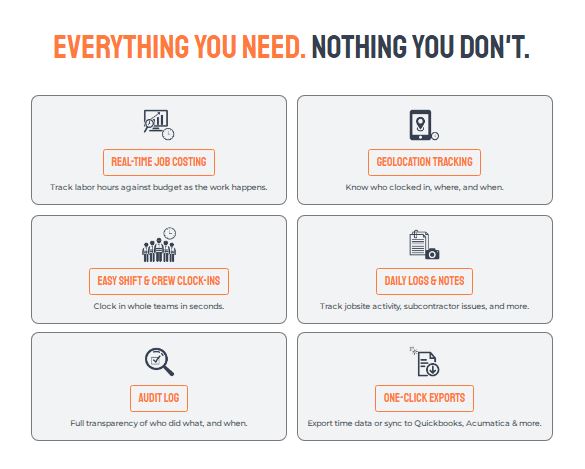
1. GPS Tracking — Because Verification Is Not the Same as Distrust
Picture a crew of 12 spread across two sites. One foreman is managing both. Time entries come in at the end of the day, mostly from memory.
Most businesses rely on trust. But trust without any verification leads to early clock-ins, late clock-outs, and situations that are impossible to resolve fairly. GPS tracking answers one simple question: was the employee actually on-site? That single answer eliminates a surprising amount of payroll leakage, and protects your relationship with the employees who are doing the right thing.
2. Geofencing — Turning Job Site Locations Into Clock-In Rules
An employee clocks in from the parking lot three blocks away. Another logs hours from home the night before the shift starts.
GPS tells you where someone is. Geofencing controls when they're allowed to clock in. No clock-ins before arrival on-site. No accidental duplicate entries. It is a small feature with a large operational impact.
3. Offline Functionality — Because Real Job Sites Aren't Always Connected
A crew of eight is working inside a concrete structure with zero signal. Shift ends. Nobody can clock out. Hours get estimated later.
This is where many tools fail completely. Field environments don't always have reliable internet. If your system requires a connection to log time, you will get missed entries, delayed logs, and incomplete data, guaranteed. A system built for the field works offline and syncs automatically when connectivity returns. If a vendor can't show you how that works in a demo, that's a red flag.
4. Mobile-First Design — Not a Desktop Tool Shrunk Down for a Phone
A field worker opens the time tracking app on his phone. It takes four taps to find the clock-in button. He closes it and texts his hours to the foreman instead.
If the app is not fast and simple to use, your crew won't use it properly. And if they don't use it properly, your data becomes unreliable. An actual mobile-first system is designed from the ground up for how field teams work, not adapted from something built for an office.
5. Identity Verification — Solving the Buddy Punching Problem
Two guys on a crew have an arrangement. One shows up late. The other clocks in for both of them. It's happened for months. Nobody caught it.
It happens more than most owners want to admit. Employees clock in for each other. Hours get logged that don't match what actually happened on-site. Photo verification adds a simple, non-intrusive layer of accountability that removes the ambiguity, without creating an adversarial environment for the team members who are showing up every day and doing the right thing.
6. Real-Time Visibility — No More End-of-Week Surprises
It's Wednesday. A job is trending 12% over on labor. Nobody knows until Friday when payroll closes. By then, there's nothing left to do but absorb the loss.
Most field businesses operate on delayed data. They find out what went wrong after payroll closes, after the job is done, after the margin is already lost. Real-time visibility means you can see who is working, where they are, how long they've been on-site, and how that maps against budget, right now, while you can still act on it.
7. Payroll Integration — Where Most Errors Actually Enter the System
Payroll admin re-keys 44 employees' hours from one system into another. It takes three hours and produces six errors that take another hour to find.
Time tracking is rarely where payroll errors originate. Manual data transfer is. Every time hours are re-keyed from one system into another, mistakes enter. Integration removes that entire layer. Suddenly payroll becomes a process, not a weekly scramble to find and fix errors before the deadline.
8. Job and Task Tracking — Because Hours Without Context Tell You Nothing
An employee logged 8 hours on Tuesday. Against which job? Which phase? Which cost code? Nobody's sure. The number goes into payroll as a general labor entry.
Knowing someone worked eight hours is only half the picture. You also need to know which job those hours went to, which phase or task, and under which cost code. This is where field time tracking becomes a job costing tool, and where you start getting actual business intelligence out of your labor data instead of just a headcount log.
9. Reporting and Insights — Knowing Which Jobs Are Actually Making You Money
You bid three similar jobs last quarter. One came in profitable. Two didn't. You're not sure why. So the next bid is built on the same assumptions.
Most businesses collect data. Very few actually use it to make better decisions. The right system helps you answer the questions that directly affect profitability: which jobs are consistently over budget, which crews are most efficient, and where time is actually going. Those answers are where your next round of margin improvement lives.
10. Scalability — Because Growth Breaks Systems That Weren't Built for It
At 15 employees, the spreadsheet worked. At 35, it started cracking. At 50, it collapsed entirely, right in the middle of the busiest season of the year.
What works at 10 employees often breaks at 40. What works at 40 can collapse at 100. If your current system isn't built to scale with you, you will face a disruptive and expensive transition right at the moment your business is growing fastest. Build on something that grows with you from the start.
The Real Cost of Getting This Wrong
Most businesses evaluate time tracking tools on price. But the actual cost of the wrong system is not the subscription fee.
Payroll errors that go undetected for weeks
Time discrepancies that go unaddressed because there's no proof either way
Admin hours spent chasing timesheets every single cycle
Job cost overruns that appear three weeks too late to fix
Decisions made on guesswork instead of data
Even a 1-2% inefficiency in labor costs can translate into thousands of dollars lost every year. For a 40-person crew, that number compounds fast.
How TotalTime Covers All 10
TotalTime wasn't built in a boardroom for a theoretical field team. It was built for contractors who have real crews, real job sites, and real payroll deadlines.
Every feature on this list, GPS tracking, geofencing, offline functionality, mobile-first design, identity verification, real-time visibility, payroll integration, job and task tracking, reporting, and scalability, is built into a single connected system.
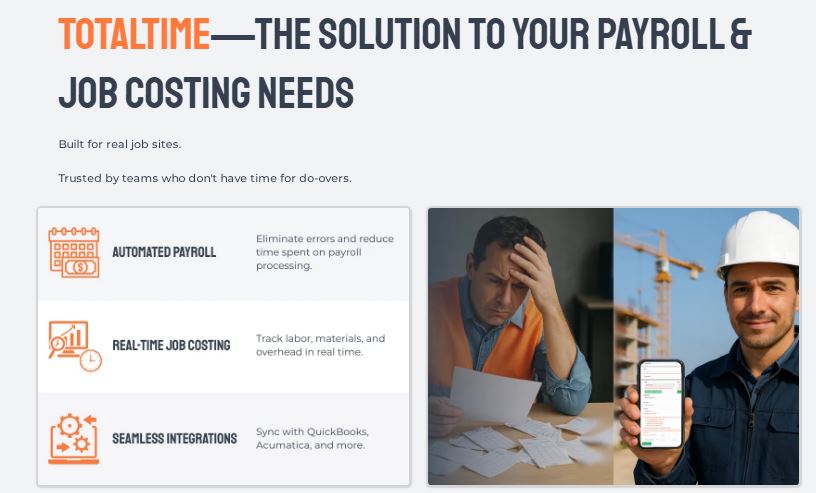
The result is not just cleaner payroll. It's full visibility into your largest expense, in real time, from the field, without the chaos.
"I evaluated four platforms before choosing TotalTime. The others had pieces of what I needed. TotalTime had all of it, and it actually worked the way my crews work. That made all the difference."
Sandra M., Operations Director, Summit Site Services
Trusted by contractors managing 5 to 500+ employees. Integrated with QuickBooks, Acumatica, and more. No long-term contracts.
Before You Choose Any System, Ask Yourself These Questions
Do I fully trust every hour that ends up in payroll?
How long does payroll prep actually take each cycle, honestly?
Can I see labor costs in real time, or only after the fact?
Are the decisions I'm making based on accurate data or educated guesses?
If those answers feel uncertain, that's your signal. The system is the problem, not the team.
The Friday chaos we opened with?
It's not a people problem. It's not a discipline problem. It's a system problem.
And once the system changes, everything else follows.
See TotalTime in Action
TotalTime is a field-first time tracking and job costing platform built for contractors managing 5 to 500+ employees. Integrated with QuickBooks, Acumatica, and more. No long-term contracts. Free trial available.
Book a free demo at Click Here, no sales pressure, just real results
Download the free Payroll Accuracy Guide at Click Here
Call the TotalTime team directly: 866-360-0449
Built for real job sites. Trusted by teams who don't have time for do-overs.
